Combine PDF Files into One PDF Easily
Merge Multiple PDFs - Combine several PDF files in the order you choose, all in one workflow
Custom Merge Options - Choose specific pages or ranges from different PDFs to create perfect documents
High Quality Merging - Maintain original quality without compromising images or text clarity
Document_1.pdf
5 pages
Report_2.pdf
12 pages
Appendix_3.pdf
3 pages
Merge PDFs in the Order You Want
WPS Office PDF combiner allows you to easily merge multiple PDF files in the order you want with flexible options and professional quality.
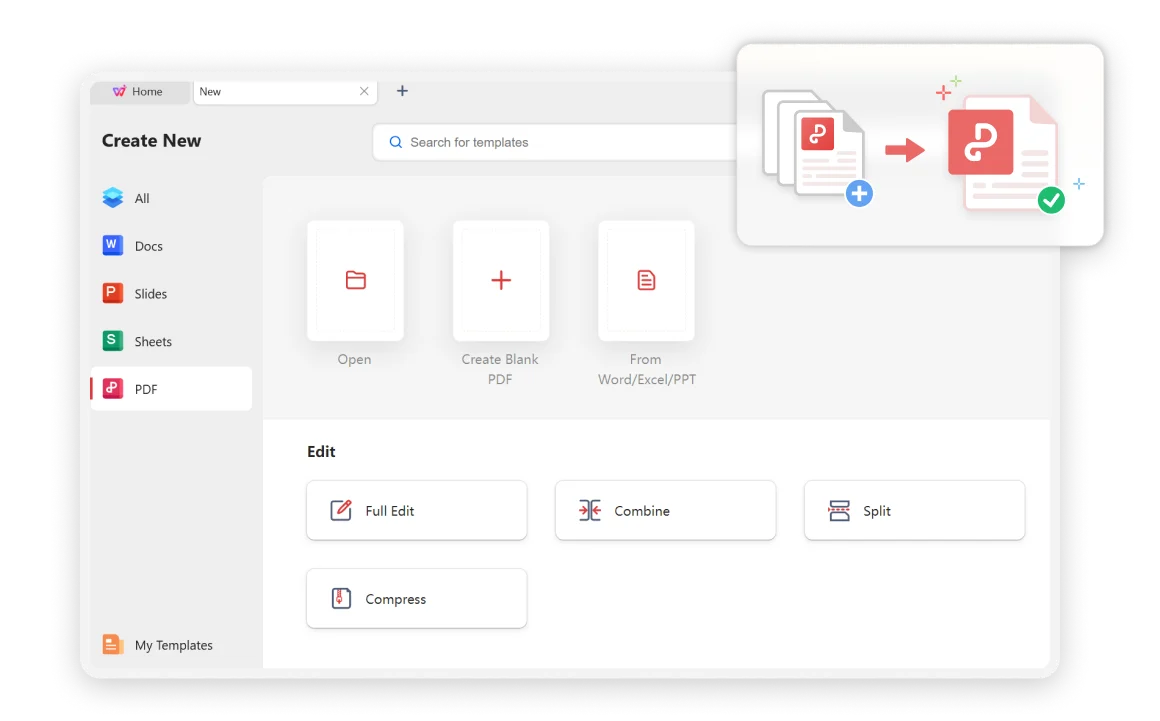
Merge Multiple PDFs flexible options
You can choose to merge multiple PDF files. Quickly combine your PDFs with just one click. Custom PDF merge option allows you to choose specific pages or range of pages from different PDF files to precisely control the final PDF file with a professional look.
- flexible options: Merge as many PDF files as you need without any restrictions.
- Custom Page Selection: Choose specific pages or page ranges from different PDF files.
- Order Control: Merge and organize your PDF files in your preferred order easily.
High Quality Merging Without Compromise
Unlike other online PDF mergers, WPS Office offers fast and efficient PDF merging without affecting the clarity of images or the quality of text. Your documents maintain their original quality throughout the merging process.
Original Quality Preserved
No compression or quality loss during merging
Fast Processing
Efficient merging even with large PDF files
Professional Results
Create polished, professional-looking documents

Easy & Fast
The easiest PDF merger available. Simply add your PDF files, arrange them in your preferred order, and merge them with just one click.
Safe & Reliable
WPS Office stands out as more secure compared to online software. With over thirty years of experience, WPS Office maintains strict privacy policies to protect your documents.
Complete PDF Suite
WPS Office is not only a PDF merger, but also a powerful PDF editor. Merge, edit, add page numbers, and organize your PDFs however you like.
3 Simple Steps to Combine PDFs
Open PDF Combiner
Navigate to 'PDF' > 'Combine' to open the PDF combiner in WPS Office. The intuitive interface makes it easy to start merging your documents immediately.
Add PDF Files
Add the PDF files you want to combine and adjust the merging settings. You can drag & drop files or browse to select them. Arrange them in your preferred order.
Merge PDFs
Click on the "Merge" button to start merging the selected PDF files and save the combined PDF file. Your merged document maintains original quality and formatting.

Explore More Features
WPS Office offers a comprehensive suite of PDF tools and office applications. From PDF editing to document creation, get everything you need in one powerful platform.


FAQs & Hot Topics
Find answers to common questions and explore trending guides about PDF combining and management.
Frequently Asked Questions
Hot Topics
How to Combine PDF Files for Your Business
Learn how to efficiently merge business documents, reports, and presentations into professional PDF packages.
How to Combine PDF Files for Students
Perfect guide for students to merge research papers, assignments, and study materials into organized PDF collections.
How to Merge Multiple PDF Files into One on Mobile
Step-by-step guide to combine PDF files on your smartphone or tablet using WPS Office mobile app.
Merge PDFs Online for Free with WPS Office
Discover how to use WPS Office online tools to merge PDF files without downloading software, available in WPS Office of charge.
Stop Struggling with PDF Combining. Start Merging Smart.
Experience the easiest and most reliable PDF combiner that merges multiple files while maintaining perfect quality - available in WPS Office.
PDF Merge
Merge multiple PDFs
Lightning Fast
One-click merging
High Quality
No quality loss
WPS Office apps:

Start Combining PDFs Like a Pro
Merge multiple PDF files with perfect quality - available in WPS Office.