High-Precision OCR - Extract text from scanned PDFs with 99.9% accuracy using advanced recognition technology
Editable Text Conversion - Convert PDFs into editable formats while preserving original layout and formatting
Multi-Language Support - Extract text in 30+ languages with AI translation capabilities
SCANNED PDF
EXTRACTED TEXT
Experience the power of advanced OCR technology that converts any PDF into editable text with perfect accuracy. From scanned documents to complex layouts, extract everything seamlessly.

Effortlessly extract text from large PDF documents with intelligent recognition technology. Supports multiple languages including Chinese, English, and more. Edit directly on the original document for seamless processing with AI translation capabilities.
Achieve error-free data recognition with our advanced OCR technology. Automatically retain the original layout and generate editable documents effortlessly. Apply free refined templates immediately after extraction.
Advanced recognition algorithms for perfect text extraction
Maintain original formatting and document structure
Convert to editable formats immediately
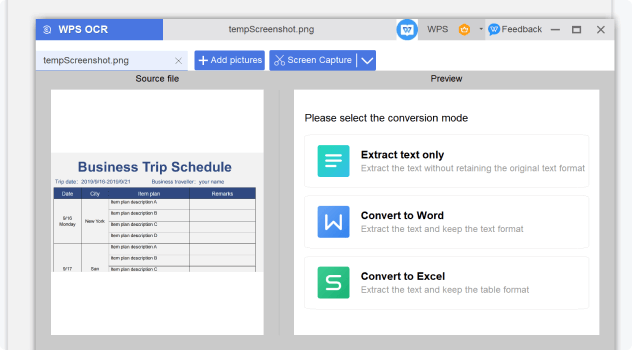

Convert scanned PDFs into editable formats with high security. Ideal for government, corporate, and legal documents, ensuring safe and reliable processing with enterprise-grade security.
Powered by cutting-edge optical character recognition technology that delivers 99.9% accuracy. Extract text from any PDF format including scanned documents and images.
Convert extracted text to multiple editable formats including Word, plain text, and more. Preserve formatting and structure for seamless editing and collaboration.
Process multiple PDFs simultaneously with our batch processing feature. Save time and increase productivity for large document workflows.
Open your PDF document in WPS Office. Whether it's a scanned document, image-based PDF, or standard text PDF, our advanced OCR technology can handle any format securely.
On the Home page, click 'Tools' > 'Extract Text' to launch the extract text feature. The advanced OCR engine will automatically analyze your document.
Compile the outputted plain text as needed and save it in your preferred format. Choose from DOCX, TXT, or other editable formats while preserving the original formatting.

WPS Office offers a comprehensive suite of PDF tools and office applications alongside the AI Photo Enhancer. From PDF editing to document creation, get everything you need in one powerful platform.
Find answers to common questions about PDF text extraction and explore trending guides.
The ultimate guide to copying and extracting text from PDF documents with step-by-step instructions and expert tips.
Learn the easiest methods to convert PDF documents to text format with step-by-step guidance and professional tips.
The ultimate guide to the best OCR software available for Windows 11, featuring comprehensive reviews and comparisons.
Comprehensive guide on WPS PDF Blog covering advanced text extraction techniques and best practices for professional use.
Experience the world's most accurate OCR technology that extracts text from any PDF with 99.9% precision - completely free and secure.
Advanced OCR technology
30+ languages supported
Multiple formats
Available on all platforms:



