Complete Page Management - Reorder, rotate, resize, add, and delete PDF pages with ease
Secure Cloud Services - Access your PDFs anywhere with 30+ years of security expertise
Cross-Platform Support - Works on Windows, Mac, Linux, Android, and iOS
PAGE MANAGEMENT
Professional PDF page management tools that give you complete control over your documents. Reorder, rotate, resize, add, and delete pages with ease.
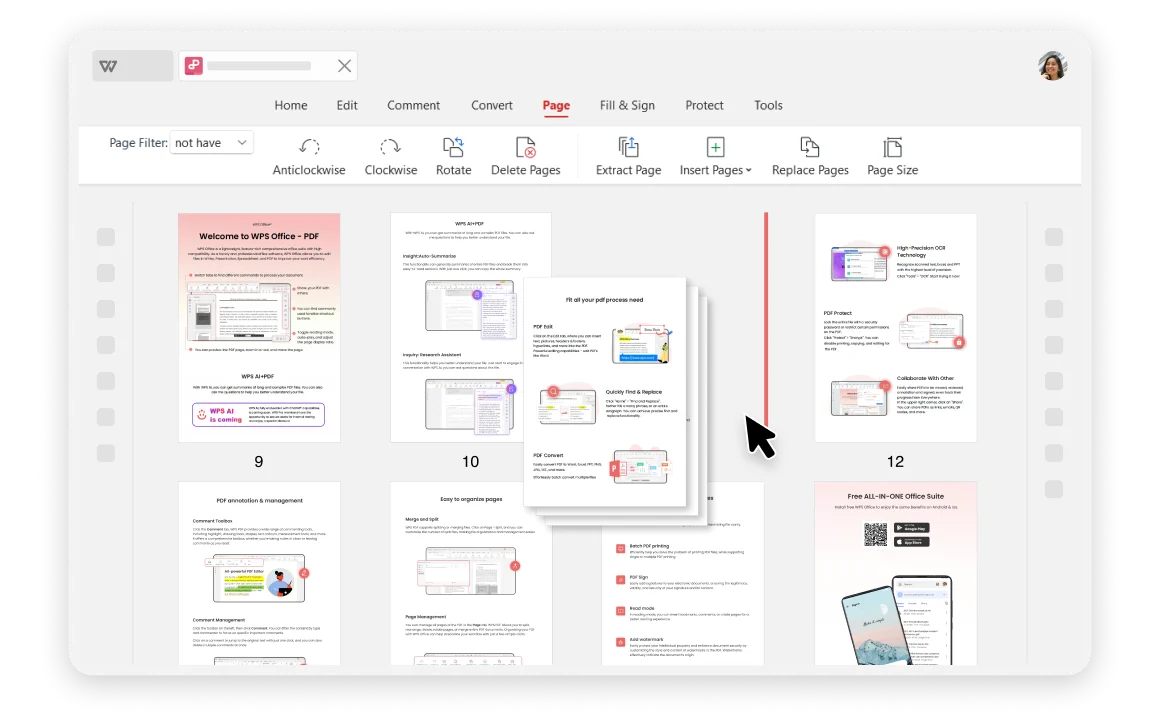
Take full control of your PDF documents with professional page management tools. Whether you need to reorganize reports, merge documents, or prepare presentations, our PDF organizer handles it all with precision and ease.
Go beyond basic organization with advanced features for professional document management. Add, delete, extract, and merge pages with precision control.
Insert pages at ideal positions and delete specific pages or ranges
Combine multiple PDF files into a single organized document
Perform bulk operations on multiple pages simultaneously

Trusted by 200+ million users worldwide. With over 30 years of experience, WPS Office provides strict privacy policies and industry-standard security for your documents.
Access and organize your PDFs from any device. WPS Office's efficient cloud services work seamlessly across Windows, Mac, Linux, Android, and iOS platforms.
Complete PDF management suite with advanced features for professionals. Perfect for business documents, reports, and presentations.
Open your PDF files in WPS Office and select "Page" on the tab. Access all page management tools from this centralized location for efficient organization.
Choose from options like rotate pages, insert to add pages, extract pages, resize, or replace pages to start organizing your PDFs exactly how you need them.
Save your changes and download the reordered or organized PDF files to your computer. Your perfectly organized document is ready for use.

WPS Office offers a comprehensive suite of PDF tools and office applications. From PDF editing to document creation, get everything you need in one powerful platform.
Find answers to frequently asked questions and explore trending guides about PDF organization.
Download the latest version of WPS PDF Organizer with enhanced features for professional document management and organization.
Learn various methods to reorder PDF pages efficiently using different tools and techniques for optimal document organization.
Master PDF page rotation with the best methods and tools available. Learn professional techniques for efficient document management.
Learn how to scan multiple pages and combine them into a single PDF using various tools and methods for efficient document digitization.
Take control of your PDF documents with the most comprehensive PDF organizer available. Reorder, rotate, resize, and manage pages with professional precision - completely free.
Proven security & reliability
Complete PDF management
Works everywhere
Available on all platforms:

Professional PDF page management with complete security and cross-platform support.


