Remove PDF Watermarks in Seconds
Instant Removal - Delete watermarks from any PDF document in seconds
Format Preservation - Keep original document layout and quality intact
Edit & Add Watermarks - Full control to customize, edit, or add new watermarks
PDF DOCUMENT
WATERMARK CONTROLS
Complete Watermark Control & Editing
WPS PDF Watermark Remover provides complete control over PDF watermarks - remove intrusive watermarks for smooth reading, edit existing ones, or add your own for copyright protection.

Remove PDF Watermarks for Smooth Reading Experience
WPS PDF watermark remover eliminates intrusive watermarks that disrupt document clarity, enabling focused content review. Once watermarks are removed, leverage the integrated translation feature to instantly convert text into your preferred language for efficient cross-border collaboration.
- Clean Document Reading: Remove all types of watermarks - text, images, or logos without damaging the content.
- Instant Processing: Remove watermarks in seconds with one-click operation.
- Format Preservation: Original document layout, fonts, and formatting remain completely intact.
Edit Watermarks Accordingly
WPS PDF watermark remover supplies manual editing on the watermarks. You can edit watermarks the way you prefer. Add watermark, remove watermark, enlarge, reduce, multiline. It has all essential functions for complete watermark control.
Remove Watermarks
Delete any existing watermarks completely
Edit Existing Watermarks
Modify size, position, opacity, and text content
Add New Watermarks
Create custom watermarks for copyright protection
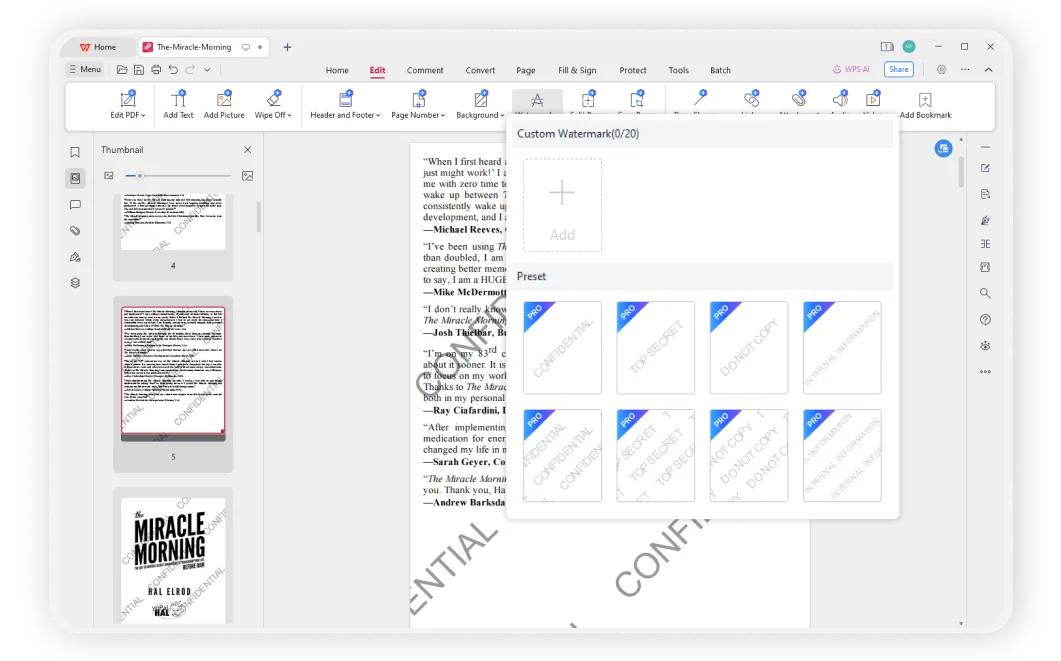

Convenient and Efficient PDF Watermark Removal
Compared to other online software, WPS is considered more convenient and easy to start with. With over thirty years of experience, it believes that customer experience comes first. As a reputable office suite, WPS Office provides robust PDF editing capabilities that adhere to industry standards.
- Batch Processing: Remove watermarks from multiple PDF files at once to save time.
- Cloud-Based Service: Access and edit your PDF files from any device with WPS Office's efficient cloud services.
- Cross-Platform: Available on Windows, macOS, Linux, Android, and iOS for maximum convenience.
Secure & Private
WPS prioritizes user security and privacy. All watermark removal processes are conducted locally on your device, ensuring that your data remains protected and confidential.
Format Preservation
WPS can effectively handle complex document formats including images, tables, charts, and different formatting styles, ensuring accurate results while preserving the original layout.
Easy to Use
Simple and intuitive interface makes watermark removal accessible to everyone. Just a few clicks to remove, edit, or add watermarks to your PDF documents.
Simple Watermark Removal Process
Open a PDF Document
Open your PDF document in WPS Office. The powerful PDF editor provides a secure environment for all your document editing needs, including watermark management.
Launch the PDF Watermark Remover
On the Home page, click 'Edit' > 'Watermark' to launch the watermark remover in WPS Office. Access all watermark management tools from this intuitive interface.
Customize and Save Your Document
Add, eliminate, or edit watermarks as needed. Save your customized edition with all formatting preserved. Your document will maintain its original quality and layout.

Explore More Features
WPS Office offers a comprehensive suite of PDF tools and office applications. From PDF editing to document creation, get everything you need in one powerful platform.


FAQs & Hot Topics
Find answers to common questions about PDF watermark removal and explore trending guides.
Frequently Asked Questions
Hot Topics
How to Remove Watermarks from PDFs Using WPS Office
Complete guide to removing watermarks from PDF documents while maintaining perfect formatting and document quality.
Removing Watermarks in WPS Office on Mobile Devices
Learn how to remove watermarks from PDF documents using WPS Office on your mobile device with this detailed step-by-step guide.
Alternative Methods to Remove Watermarks from PDFs
Discover various free methods and alternative approaches to remove watermarks from PDF documents effectively.
How to Add Watermark in Word
Learn how to add custom watermarks to Word documents for copyright protection and branding purposes with this quick tutorial.
Clean PDFs. Remove Watermarks Instantly.
Experience the most efficient PDF watermark remover that removes watermarks in seconds while preserving document quality and formatting - available in WPS Office.
100% Secure
Local processing only
Instant Removal
Remove in seconds
Format Preserved
Layout stays intact
WPS Office apps:

Start Removing Watermarks Now
Clean your PDFs instantly with our powerful watermark removal tool - available in WPS Office.