Text & Image Watermarks - Add custom text or logo watermarks with full control over style and positioning
Complete Customization - Adjust font, size, color, rotation, transparency, and position to match your needs
Secure & Professional - 30+ years of experience with strict privacy policies and industry-standard security
PDF WITH WATERMARK
Add professional watermarks to your PDF documents with complete control over appearance, positioning, and transparency. Perfect for protecting intellectual property and branding.

Create professional text or image watermarks with full control over style, positioning, and transparency. Customize fonts, colors, rotation angles, and opacity to perfectly match your brand or security requirements.
Watermarks add a professional touch to your PDF documents while providing essential security and organization benefits. Perfect for contracts, reports, presentations, and confidential materials.
Add company logos and maintain consistent branding
Prevent unauthorized copying and modification
Mark documents as drafts, confidential, or final versions

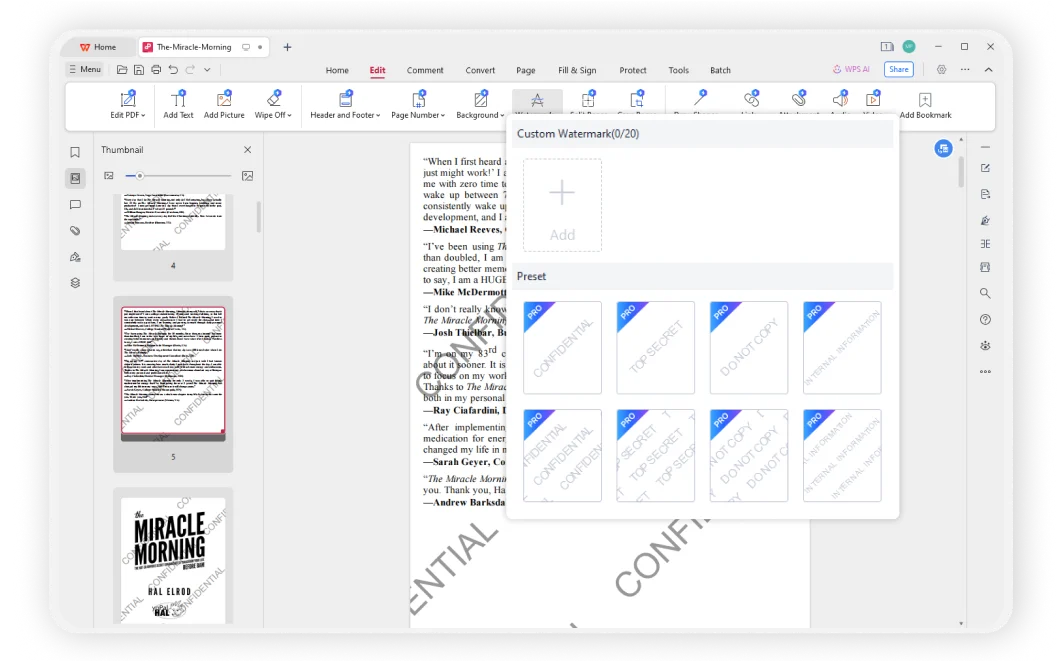
With over 30 years of experience and strict privacy policies, WPS Office provides a secure and reliable platform for watermarking your PDF documents. Access your files from any device with cloud synchronization.
Create custom text or logo watermarks with complete control over fonts, colors, size, rotation, position, and transparency. Perfect for branding and document protection.
Add a professional touch to your documents while maintaining security. Perfect for business contracts, legal documents, presentations, and confidential materials.
Add watermarks to your PDFs completely free with WPS Office. Trusted by 200+ million users worldwide with 30+ years of experience in document security.
Launch WPS Office and open the PDF file you want to add a watermark to. The intuitive interface makes it easy to navigate and access all PDF editing features.
Click 'Edit' in the toolbar, then find the 'Watermark' option. Choose between Text Watermark or Preset Watermark options.
Enter your desired text and adjust settings like font, size, color, rotation, and transparency. Preview the watermark to ensure it meets your requirements, then apply it to your PDF.

WPS Office offers a comprehensive suite of PDF tools and office applications alongside the AI Photo Enhancer. From PDF editing to document creation, get everything you need in one powerful platform.
Find answers to common questions about PDF watermarking and explore helpful tutorials.
Complete step-by-step guide to adding professional watermarks to your PDF documents using WPS Office.
General guide covering watermark basics and best practices for document protection and branding.
Detailed tutorial on inserting watermarks with advanced customization options and positioning techniques.
Specialized guide for adding watermarks to tables and structured data in PDF documents.
Create custom watermarks with complete control over style, positioning, and transparency. Protect your intellectual property and add professional branding - completely free.
Text, images, fonts, colors
30+ years experience
See before you apply
Available on all platforms:

Protect your documents with custom watermarks - completely free and secure.


