Auto-Save Protection - Built-in backup saves your files locally in real-time within WPS Office
Version History - Track every edit with incremental backup and easy recovery
Cloud Sync - Access your protected documents from any device with WPS Drive
AUTO BACKUP ACTIVE
WPS Document Backup provides comprehensive protection for all your important files. From automatic local saves to cloud synchronization, your work is always secure and accessible.

Auto-saves your documents locally in real time within WPS Office environment. Seamless user experience—no need to install or configure third-party tools. Find peace of mind, keep editing documents with knowing backups are happening in the background.
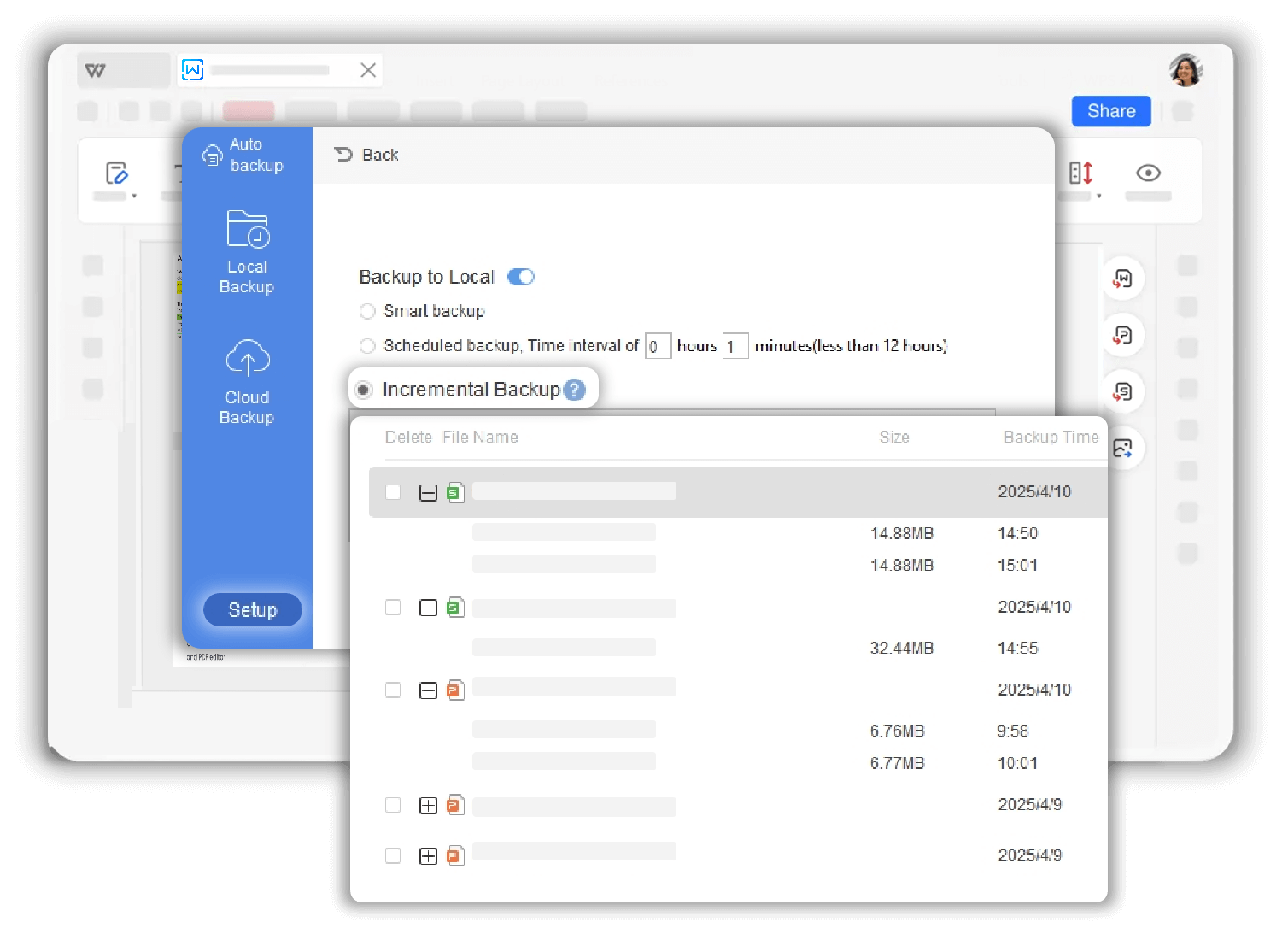
Backed up incrementally with each document change timestamped for easy recovery. Access multiple versions where each read operation is recorded to ensure consistency with the source file. Find the version easily with backup versions stored under a single file record.
Every change is saved with precise timestamps
Restore any previous version with one click
All versions grouped under single file records

WPS Drive backs up files or folders to WPS Cloud Drive and access them from any device. Multi-device synchronization allows you to work on the same document across mobile, PC, and tablet. Cloud-based protection guards your work against local hardware failure or accidental deletion.
Built-in auto backup saves your files directly into WPS Office environment. No manual action needed - your work is protected in real-time as you edit.
Incremental backup with timestamps for easy recovery. Access multiple versions with organized storage under single file records.
WPS Drive provides cloud backup and synchronization across mobile, PC, and tablet. Protection against hardware failure and accidental deletion.
On the Home page, click 'Auto backup' to launch the backup tool in the WPS Office. The feature is built directly into your workspace for easy access.
Look for edit versions of files in local backup, or upload files and folders in Cloud Backup to sync your work across all your devices seamlessly.
Click Setup to customize your backup settings. Configure auto-save frequency, choose storage locations, and set up cloud sync preferences to match your workflow.

WPS Office offers a comprehensive suite of PDF tools and office applications alongside the AI Photo Enhancer. From PDF editing to document creation, get everything you need in one powerful platform.
Find answers to common questions and explore trending topics about WPS Document Backup.
Complete guide to recovering files deleted by mistake, unsaved files, and accessing backup files in WPS Office.
Learn how to locate and access auto-saved backup files in WPS Office for quick file recovery.
Discover various methods to locate and organize your files in WPS Office for better file management.
Step-by-step tutorial on opening autosave files in Excel using WPS Office for quick file recovery.
Experience complete document protection with automatic backup, version history, and cloud sync - all built into WPS Office, completely free.
Real-time backup built-in
Track every change
Multi-device access
Available on all platforms:

Never lose work again with automatic backup and version history - completely free.


