Built-in Split or Merge Tool - No need for external plugins or add-ons
Perfect Formatting Preservation - Original styles and layouts stay intact
Batch Processing & Page Selection - Merge multiple documents with selected pages
MERGED DOCUMENT
WPS Office provides an intuitive interface that simplifies the process of word document merging. Built-in Split or Merge tool designed to lighten your burden and ensure beginner-friendly operation.

WPS Office provides an intuitive interface that simplifies the process of word document merging. The built-in Split or Merge tool is designed to lighten your burden and ensure beginner-friendly operation with straightforward prompts.
Quickly merge multiple documents into a single file with selected pages. Easily choose specific pages for hassle-free merging with a few simple clicks, disposing of unwanted pages efficiently.
Easily select specific pages from multiple documents
Remove unwanted pages with simple clicks
Merge documents efficiently with minimal effort
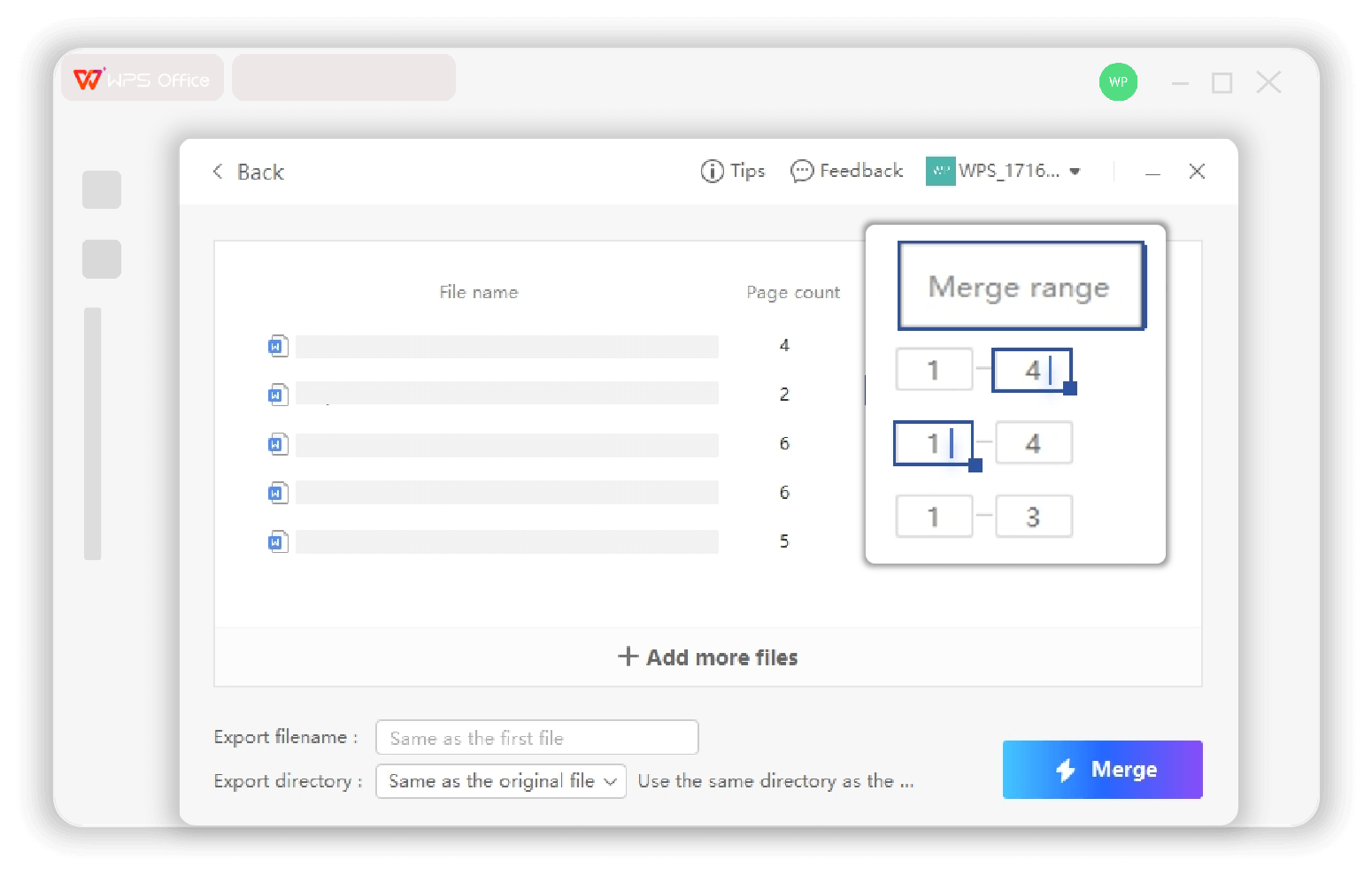

Built-in feature allows you to directly access the word document merge functionality from WPS tools. Save time by not needing to open each file individually - simply select all documents and merge at once.
Access Split or Merge functionality directly from WPS Office tools. No need for external plugins or add-ons - everything you need is built right in.
Original formatting and layout of each document section are preserved perfectly in the merged file. Styles, fonts, and structures remain intact.
Available on Windows, macOS, Linux, Android, and iOS. Merge documents anytime, anywhere with secure and convenient access.
On the Home page, click 'Productivity Tools' > 'Split or Merge' to launch the document merger in WPS Office. This built-in feature provides seamless access to document merging capabilities.
Open or drag in the Word documents you want to merge in WPS Office tool. You can select multiple documents at once for batch processing, making the workflow efficient and streamlined.
Arrange and customize the merged document as needed. Select specific pages, reorder content, and save your version as a new file with all original formatting preserved.

WPS Office makes merging multiple Word documents easy and secure. Its intuitive interface allows for batch processing and provides convenient, flexible access anytime - whether online or offline.
WPS Office makes merging multiple Word documents easy and secure. Its intuitive interface allows for batch processing, enabling you to combine multiple files in just a few clicks—saving time and ensuring document integrity.
Whether online or offline, WPS Office provides a secure and convenient merging experience. Compatible with Windows, MacOS, Linux, Android, and iOS, it ensures you can manage and merge documents anytime, anywhere.
For further operations, file split can also be done in WPS.
WPS Office offers a comprehensive suite of PDF tools and office applications alongside the AI Photo Enhancer. From PDF editing to document creation, get everything you need in one powerful platform.
Find answers to common questions and explore helpful guides to master WPS document merging.
Complete step-by-step guide for merging multiple Word documents using WPS Writer's built-in tools.
Explore advanced features and capabilities of the Split or Merge tool in WPS Office for enhanced productivity.
Learn advanced batch processing techniques for merging multiple files efficiently and saving valuable time.
Step-by-step guide for merging Word mail documents to PDF format using WPS Office's advanced features.
Experience the most intuitive document merger that preserves 100% of your formatting while offering batch processing and page selection - completely free.
No external plugins needed
Merge multiple files at once
Formatting preserved
Available on all platforms:

Experience effortless document merging with perfect formatting preservation - completely free.


