
Role context
Keep the candidate record connected to the vacancy.
Original editable file
Track role references, candidate IDs, interview stages and next actions in a workbook. Use WPS Spreadsheets to coordinate a small recruitment process. Download the original editable starter to work through the example.
Original English XLSX starter included. Edit in WPS Spreadsheets; advanced features vary by version and platform.
See how it works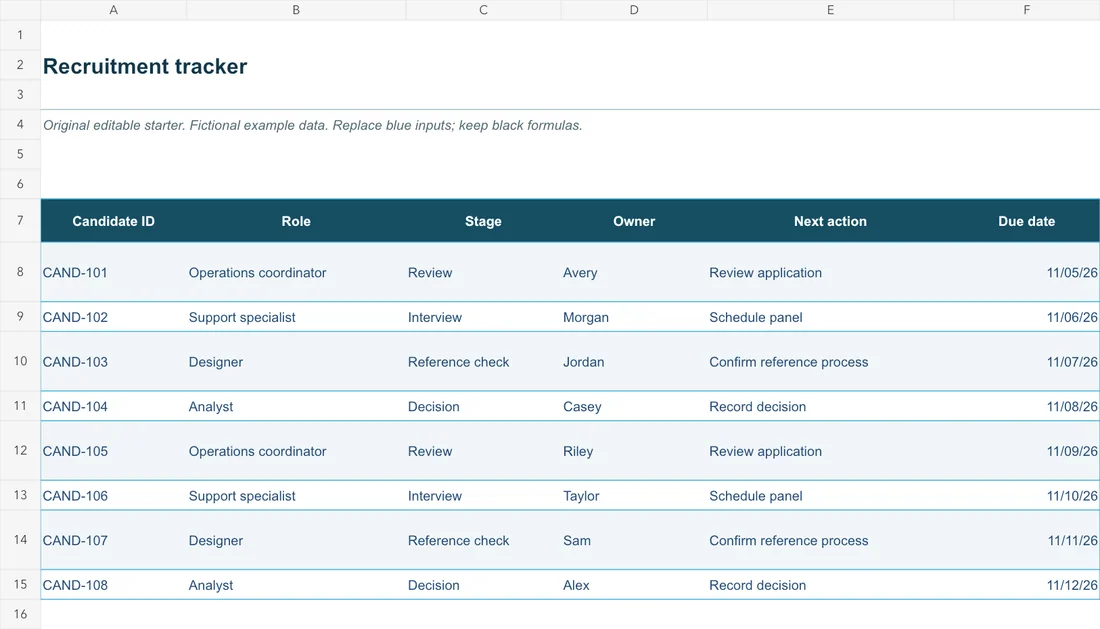
Original editable file
Original recruitment tracker example with task instructions and editable inputs.
This editable sample is in English. Open it in WPS Office and replace the example content with your own. The starter file is separate from the WPS app download.
Explore the original starter and related workflows. Each file stays editable in WPS Office.
About this workflow
Use WPS Spreadsheets to work on the file, review the details and save the result in a suitable format.
Keep the candidate record connected to the vacancy.
Use consistent definitions for the process.
Avoid losing follow-up between interview steps.
Using WPS Office
Install WPS Office, then follow these steps in the app. This webpage does not edit or convert your files.
Define the hiring stagesUse your approved process.
WPS Office
Work with your everyday office files in one app. Keep an editable source file and choose the sharing format your audience needs.
Explore this WPS capabilityHelp and information
This page downloads WPS Office. Features vary by platform, version and plan.
The workbook does not screen candidates, rank suitability or make hiring decisions.
An original XLSX example with candidate id, role, stage, owner, next action, fictional records and task instructions. Replace the example inputs with your own verified information.
Open the downloaded file in WPS Spreadsheets. This page does not upload or process your workbook. Keep an original copy, inspect formulas and save the reviewed result in the format your workflow needs.
On Windows or macOS, WPS starts the app download. On Linux, copy the installation command or choose a manual package. On iPhone, iPad, Android or Chromebook, continue to the appropriate app store. This page does not upload, convert or edit your files.
Start with WPS Office
Get WPS Office for Windows.
Original English XLSX starter included. Edit in WPS Spreadsheets; advanced features vary by version and platform.