
Hours with context
Keep the date, project and work description together.
Original editable file
Record daily start, finish and break hours in an editable timesheet. The WPS Spreadsheets starter calculates net hours and keeps project notes beside each entry.
Original XLSX starter included. Edit in WPS Spreadsheets; advanced feature availability varies by version and platform.
See how it works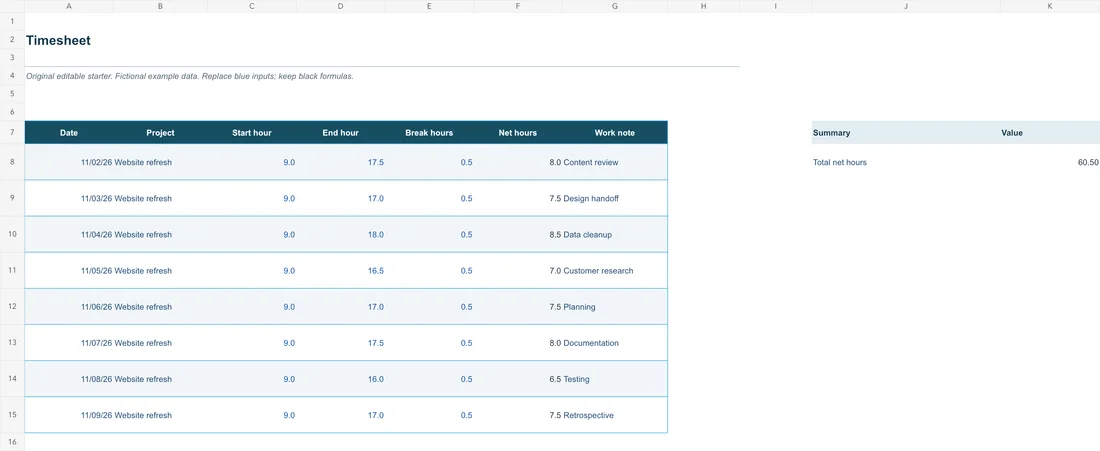
Original editable file
Original timesheet workbook with illustrative data and editing instructions.
This editable sample is in English. Open it in WPS Office and replace the example content with your own. The starter file is separate from the WPS app download.
About this workflow
Use WPS Spreadsheets to work on the file, review the details and save the result in a suitable format.
Keep the date, project and work description together.
Subtract unpaid break hours from the elapsed shift.
Review daily net hours before using the weekly total.
Using WPS Office
Install WPS Office, then follow these steps in the app. This webpage does not edit or convert your files.
Enter the work periodUse the actual date, start time and finish time.
WPS Office
Work with your everyday office files in one app. Keep an editable source file and choose the sharing format your audience needs.
Explore this WPS capabilityHelp and information
This page downloads WPS Office. Features vary by platform, version and plan.
No. It totals net recorded hours. Overtime, pay rules, approval and payroll calculations depend on your organization and are not included.
An original editable XLSX example with date, project, start hour, end hour, break hours and task instructions. Enter hours on a 24-hour clock as decimals. Overnight finish times use the next day; overtime rules are excluded.
Download the starter and open it in WPS Spreadsheets. Editing happens in the app; this page does not process or upload your workbook. Save an XLSX copy to keep working, or export a reviewed view as PDF.
On Windows or macOS, WPS starts the app download. On Linux, copy the installation command or choose a manual package. On iPhone, iPad, Android or Chromebook, continue to the appropriate app store. This page does not upload, convert or edit your files.
Start with WPS Office
Get WPS Office for Windows.
Original XLSX starter included. Edit in WPS Spreadsheets; advanced feature availability varies by version and platform.